How to enable the sound on VPS?

Please open a new support ticket so we shall enable the sound on server side.
1. After our answer to the support ticket please do Log off from your VPS (not disconnect but log off).
2. Open Remote Desktop client and set the audio.
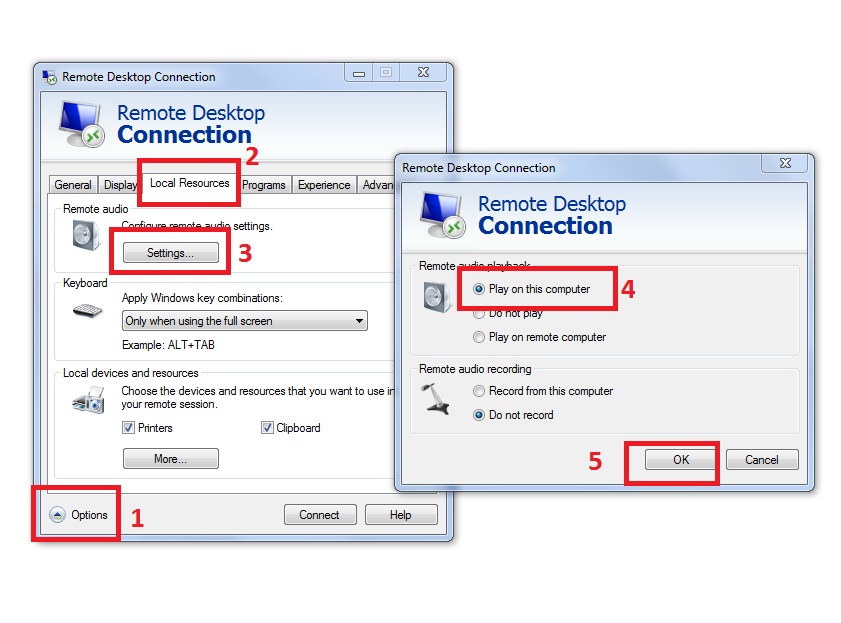
rdsound.jpg

3. Connect to your VPS.
4. Please be sure to adjust the sound volume level of your home computer and VPS desktop.
In case of non-Windows remote desktop client please set the relevant settings.

  • 184 Utilisateurs l'ont trouvée utile
Cette réponse était-elle pertinente?

Related Articles

I cannot connect to my VPS.

The reason for access problem can be at many points between your home location and VPS. For...

How to change the billing period?

If you wish to change the billing period, e.g. from a monthly plan to yearly plan, please open a...

What virtualization technology you are using?

We are using ESXi hypervisor by VMware.

How to connect to ForexVPS with Remote Desktop?

1. If you have Windows 8, 8.1 or 10 on your computer: There are 3 ways to start Remote Desktop...

How to request cancellation?

You could request service cancellation anytime you would like to.Please request a service...